Dynamics All-in-one

SoundsBetter

Louder and denser. No pumping.

SoundsBetter in jd.Edit

What the effect is for

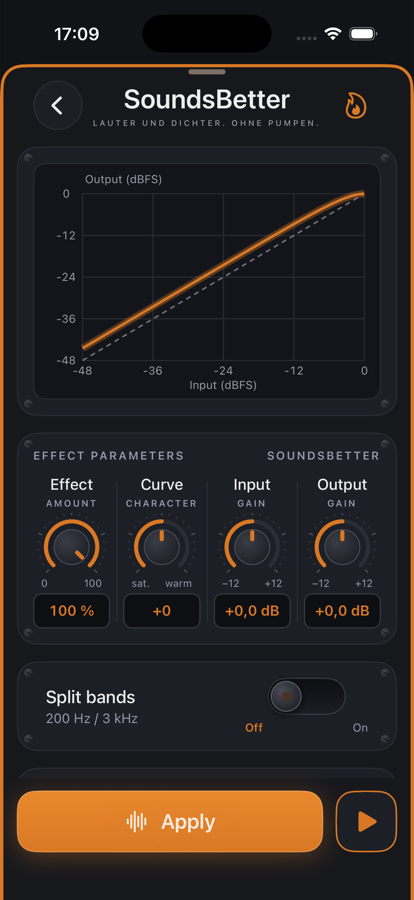
SoundsBetter is not a compressor with time constants but a static transfer curve: every sample value is mapped instantly, quiet parts are lifted, peaks softly pushed toward 0 dBFS. That makes the signal louder and denser — without pumping, because nothing regulates over time.

The curve is shapeable: at +50 even harmonics dominate (warmer, fuller), at −50 quiet parts stay untouched and only the upper levels are saturated. With “Split bands” bass, mids and highs run through the curve separately so the bass does not modulate the highs.

Benefits

  • ✓One knob for “louder and fuller” — ideal when there is no time for leveler and compressor.
  • ✓Peaks stay below 0 dBFS without hard clipping.
  • ✓The curve in dB shows what happens to every level; input and output gain are included.
  • ✓Preview: hear effect amount and curve live.

Included for free

When it makes sense

Quickly polish a voice memo

Effect 100 %, curve 0 — denser and more present in one step.

Music demo

Curve +30, bands split: warmer without the kick ducking the highs.

Before the limiter

As the last stage before the limiter SoundsBetter brings the loudness, the limiter holds the ceiling.

Controls

Effect0–100 % share of the processed signal.
Curve−50 (saturating) … +50 (warm).
Input / Output±12 dB before and after the curve.
Split bandsThree bands at 200 Hz and 3 kHz — toggle.

Tips

💡Input +3 dB and curve +20 is a good starting point for speech.

💡Band splitting shifts the phase slightly — leave it off for pure speech.

Chain order: High-pass → Leveler → Compressor → De-Esser → SoundsBetter → Limiter. The effects list can be reordered with “Reorder”.

Want to try it?

jd.Edit is free; every Pro feature can be used twenty times at no cost.

On the App Store