Dynamics Dynamics

De-Esser

Tame sibilance.

De-Esser in jd.Edit

What the effect is for

S, Z, Sh and T carry their energy between 4 and 10 kHz. Close microphones, bright voices and the compression before them make these sounds sharp. The de-esser measures only that band and reduces it when it exceeds the threshold — for the duration of the sound, then it is gone again.

In band mode only the high band is reduced (8th-order Linkwitz-Riley crossover, the voice below stays exact). Wideband reduces the whole signal and sounds more natural on very harsh sibilance.

Benefits

  • ✓Less harshness without dulling the voice — the range below the crossover stays untouched.
  • ✓Curve and gain reduction on the display, analysis of the whole file with the high-band peak.
  • ✓Attack from 0.1 ms: even short sibilants are caught.
  • ✓Preview: adjust frequency and threshold live until only the S sounds react.

Included for free

When it makes sense

After the compressor

The compressor lifts sibilance — the de-esser behind it takes it back.

Bright voices

Crossover 6–7 kHz, strength 4–6 dB.

Close condenser microphone

Crossover 5 kHz, wideband for very harsh S.

Controls

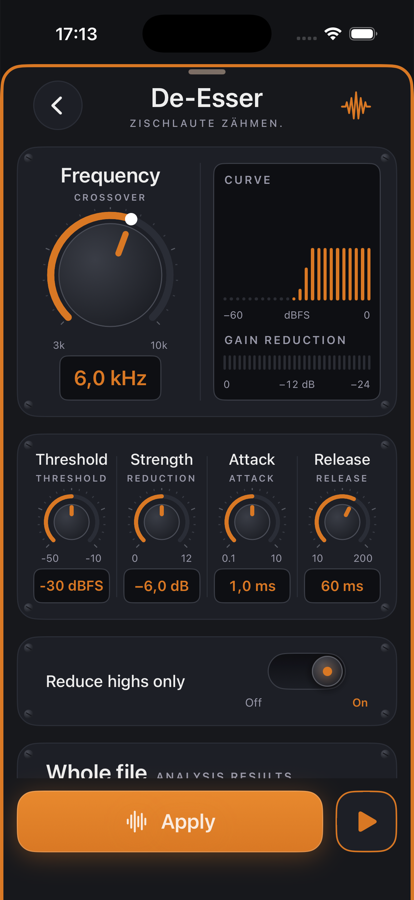
Frequency3–10 kHz crossover, large knob.
Threshold−50 … −10 dBFS in the high band.
StrengthMaximum reduction 0–12 dB.
Attack / Release0.1–10 ms / 10–200 ms.
Reduce highs onlyBand mode on, wideband off — toggle.

Tips

💡The analysis names the high-band peak: set the threshold 6–8 dB below it.

💡Too much de-essing sounds lispy — 3–6 dB of strength is almost always enough.

Chain order: High-pass → Leveler → Compressor → De-Esser → SoundsBetter → Limiter. The effects list can be reordered with “Reorder”.

Want to try it?

jd.Edit is free; every Pro feature can be used twenty times at no cost.

On the App Store