Channel strip Voice

BetterVoice

The voice channel strip.

BetterVoice in jd.Edit

What the effect is for

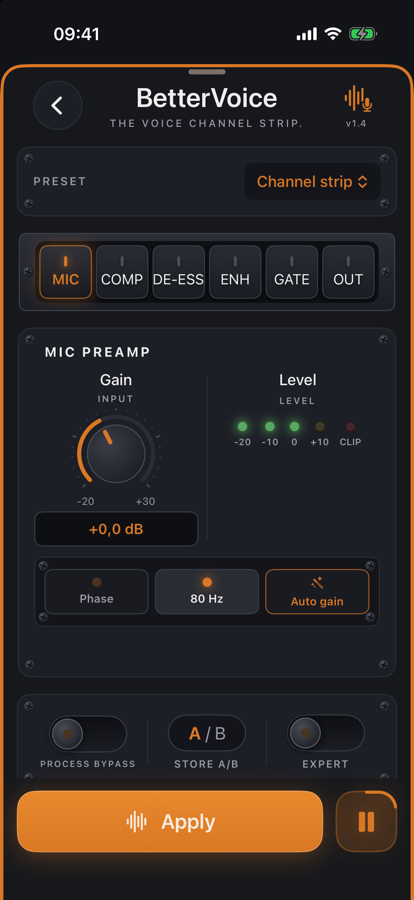
In the studio a good voice rarely comes from one effect but from a chain: preamp, rumble filter, compressor, de-esser, a little sheen and a gate against room noise. BetterVoice puts this chain on one page — each module with its own retro card, LED chains and bypass.

The analysis measures the voice and suggests settings: auto gain in the preamp, the de-esser threshold relative to the voice, the compressor's working point. The meters pulse live while previewing; A/B compares two versions, expert mode shows every knob.

Benefits

  • ✓One page instead of six effects — in the order a sound engineer would pick.
  • ✓Bypass per module and for the whole strip: hear what each stage adds.
  • ✓Presets for deep and bright voices, the iPhone microphone and reverberant rooms — plus your own.
  • ✓The waveform shows the result after applying.

Included for free

When it makes sense

Podcast voice

Preset “Channel strip” as a starting point, then drive and sheen by ear.

Recorded on iPhone

Preset “iPhone Microphone”: more body, less hiss, steadier level.

Reverberant room

Gate and high-pass take room and rumble out of the pauses.

Controls

MICPreamp with gain, auto gain, phase and 80 Hz high-pass.
COMPDrive and density — how hard and how dense the compression.
DE-ESSFrequency and threshold relative to the voice.
ENHBody and sheen (LF/HF detail).
GATEThreshold, ratio, depth — against room noise in pauses.
OUTOutput level with true-peak protection.

Tips

💡Analyse first, then compare single modules with bypass — a voice rarely needs all six.

💡For audiobooks keep the compressor gentle; liveliness matters more than perfect evenness.

Chain order: High-pass → Leveler → Compressor → De-Esser → SoundsBetter → Limiter. The effects list can be reordered with “Reorder”.

Want to try it?

jd.Edit is free; every Pro feature can be used twenty times at no cost.

On the App Store