Restoration Restoration

NoiseFloor

Reduce background noise.

NoiseFloor in jd.Edit

What the effect is for

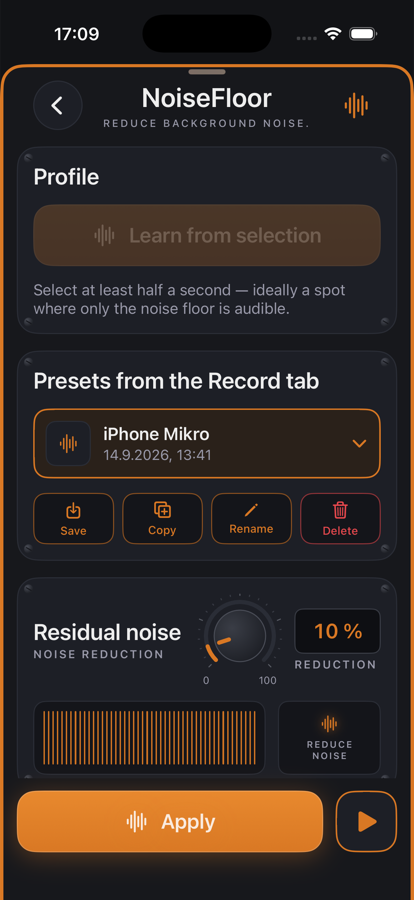
Every room and every microphone has its own noise floor: fans, power supplies, the hiss of the preamp. NoiseFloor learns that spectrum from a spot where only the noise is audible and subtracts it from the whole signal — line by line, with a method that spares the voice.

The learned profile can be saved as a preset. In the Record tab it is applied right after you stop; in the editor at any time later — also on imports from other apps.

Benefits

  • ✓Learns from half a second of silence; a few seconds make the estimate calmer.
  • ✓Presets per microphone and room: learn once, apply again and again.
  • ✓Adjustable residual noise: a touch of noise sounds more natural than digital silence.
  • ✓Fine-tuning against metallic burbling: strength, smoothing over time and frequency.
  • ✓After applying, the waveform shows the cleaned source.

Included for free

When it makes sense

Home-office podcast

Fan and street noise between sentences disappears, the voice stays.

iPhone voice memos

The built-in microphone hisses audibly — an “iPhone mic” preset cleans every recording.

Old recordings

Reduce tape hiss from digitized cassettes or dictation machines.

Controls

Profile“Learn from selection” or a preset from the Record tab.
Residual noise0–100 %: how much of the noise stays audible.
StrengthHow hard the reduction bites.
SmoothingOver time and over frequency — against artifacts.

Tips

💡10 % residual noise is a good default: the hiss is gone, breaths and room still sound real.

💡The selection used for learning should contain nothing but noise — no breathing, no creaking chair.

Chain order: High-pass → Leveler → Compressor → De-Esser → SoundsBetter → Limiter. The effects list can be reordered with “Reorder”.

Want to try it?

jd.Edit is free; every Pro feature can be used twenty times at no cost.

On the App Store