Restoration Restoration From version 1.8

DeClick

Remove clicks and crackle.

DeClick in jd.Edit

What the effect is for

A click is a short outlier the surroundings don't explain. DeClick predicts every sample from its predecessors (a 32nd-order model) and flags where the deviation sits clearly above the normal residual. The gap grows as far as the click reaches and is recomputed from both sides (LSAR) — the sound runs through as if nothing happened.

A dedicated Core ML model checks every detection: plosives, consonants and attacks look like clicks to plain maths — the AI check leaves them alone. A second “crackle” pass finds the dense, tiny clicks of an old record. A single click can also be selected and removed precisely; the automatic mode learns how sensitive it would have to be to find it on its own.

Benefits

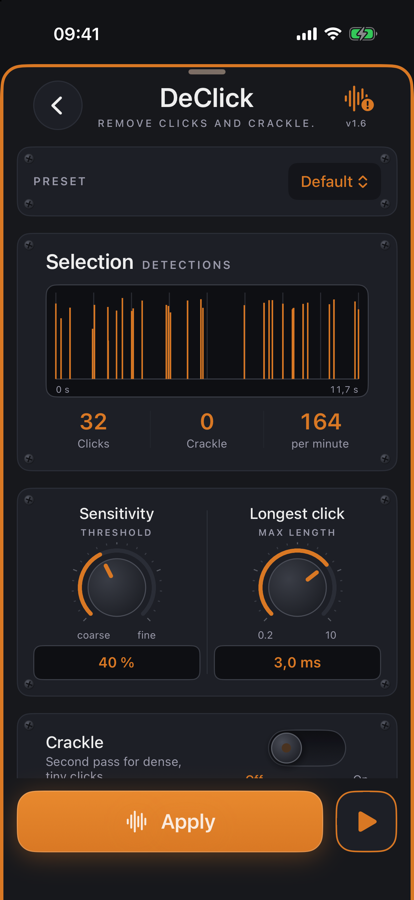
  • ✓Detections at a glance: red marks in the waveform, timeline and counters in the effect.
  • ✓“Listen to removed only” plays exactly what is taken out — so you hear whether speech goes with it.
  • ✓Works on the selection or the whole file; Undo restores everything.
  • ✓Presets for speech, vinyl and crackle — plus your own.

Pro feature — try it twenty times for free, then a one-time unlock.

When it makes sense

Digitized record

Preset “Vinyl” with the crackle pass — the music stays, the crackling goes.

Interview with interference

Remove radio or cable pops from a recording without touching the voice.

Mouth noise

Smacks and lip clicks in voice recordings with “Speech, careful”.

A single click

Select it briefly (up to 100 ms) — DeClick analyses exactly that spot and replaces it.

Controls

SensitivityCoarse to fine — how clear an outlier has to be.
Longest click0.2 … 10 ms — longer disturbances stay untouched.
CrackleSecond pass for dense, tiny clicks, with its own sensitivity.
AI checkKeeps detections the model recognises as speech or music.

Tips

💡Run “Analyse” first and look at the red marks, then preview — and only then apply.

💡If “Listen to removed only” sounds like speech, lower the sensitivity.

Chain order: High-pass → Leveler → Compressor → De-Esser → SoundsBetter → Limiter. The effects list can be reordered with “Reorder”.

Want to try it?

jd.Edit is free; every Pro feature can be used twenty times at no cost.

On the App Store