Dynamics Dynamics

Leveler

Gently even out speech loudness.

Leveler in jd.Edit

What the effect is for

A voice drifts over a recording: the speaker leans back, gets quieter, comes closer again. A compressor works too fast for that — it hears syllables, not sentences. The leveler measures loudness per ITU-R BS.1770 over seconds and follows with the gain so slowly that nothing audible happens within a word.

During pauses the gain freezes so the room noise is not pulled up. A dead zone keeps the leveler from reacting to small deviations at all.

Benefits

  • ✓Even loudness across the whole episode — without a compressor's pumping.
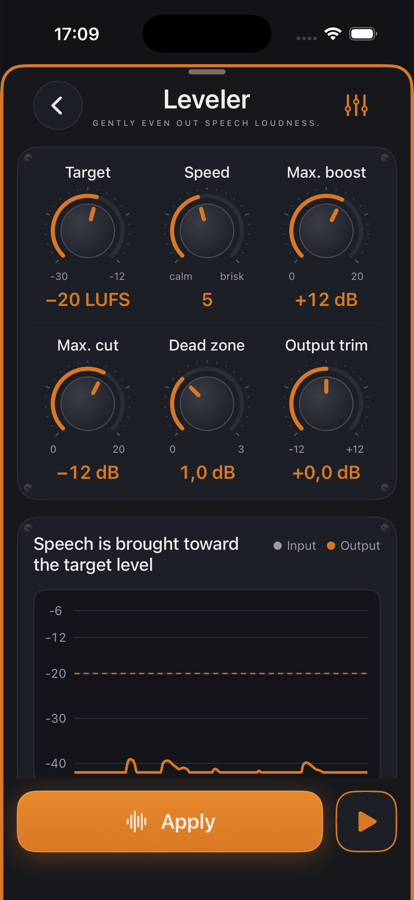
  • ✓Analysis up front: the chart shows input (grey) and output (orange) over time, plus “on target” and “frozen” figures.
  • ✓Six knobs, plus an expert section for time constants and freeze.
  • ✓The gain curve can be shown over the waveform in the editor.

Included for free

When it makes sense

Podcast with two guests

The quiet guest and the loud host land on the same loudness target.

Audiobook

Long readings with the voice fading over hours stay even.

Interview on the go

Changing distance to the microphone is compensated.

Controls

Target−30 … −12 LUFS; −20 is a good podcast default.
Speed1 (calm) … 10 (brisk) — macro for all time constants.
Max. boost / cutHow far the leveler may go, 0–20 dB each.
Dead zone0–3 dB: deviations below stay untouched.
Output trim±12 dB after leveling.
AdvancedManual noise threshold, peak guard, expert values.

Tips

💡High-pass before the leveler, compressor and limiter after — the leveler is the slow fader, the compressor the fast grab.

💡With music under the voice, set the dead zone to 2–3 dB, otherwise the leveler reacts to the music bed.

Chain order: High-pass → Leveler → Compressor → De-Esser → SoundsBetter → Limiter. The effects list can be reordered with “Reorder”.

Want to try it?

jd.Edit is free; every Pro feature can be used twenty times at no cost.

On the App Store