Dynamics Dynamics

Compressor

Smooth dynamics under control.

Compressor in jd.Edit

What the effect is for

Where the leveler evens out sentences, the compressor works on syllables: stressed words, laughter, a suddenly loud consonant. Everything above the threshold is reduced at the set ratio — with a soft knee so the transition is not audible.

The side-chain high-pass takes bass and plosives out of the control signal: the compressor then reacts to the voice, not to a “p” or the table — the classic pumping stays away.

Benefits

  • ✓Denser, more present speech without peaks hitting the limiter.
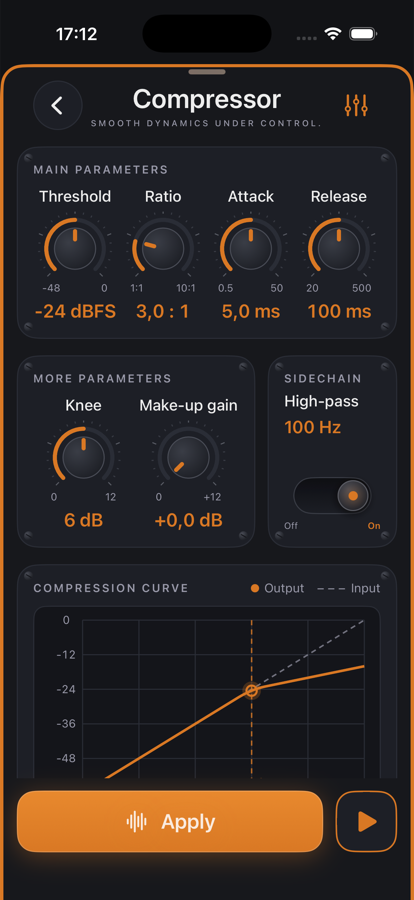
  • ✓The compression curve shows live what happens to every input level.
  • ✓Analysis delivers gain reduction as an LED row: strongest and average reduction, share of time.
  • ✓Preview with all knobs live — attack and release are audible immediately.

Included for free

When it makes sense

Podcast speech

Threshold −24 dBFS, 3:1, attack 5 ms, release 100 ms: unobtrusively denser.

Lively interviews

Laughter and exclamations are caught without changing the rest.

Music demo

Gentle 2:1 with a long release as glue for the mix.

Controls

Threshold−48 … 0 dBFS — the compressor bites from here.
Ratio1:1 … 10:1.
Attack / Release0.5–50 ms / 20–500 ms, logarithmic knobs.
Knee0–12 dB of soft transition.
Make-up gain0 … +12 dB after compression.
Side-chain high-pass100 Hz in the control signal — toggle.

Tips

💡Use it after the leveler: the leveler takes the slow drift, so the compressor needs less ratio.

💡If the analysis shows more than 6 dB average reduction, the threshold is usually too low.

Chain order: High-pass → Leveler → Compressor → De-Esser → SoundsBetter → Limiter. The effects list can be reordered with “Reorder”.

Want to try it?

jd.Edit is free; every Pro feature can be used twenty times at no cost.

On the App Store