Restoration Filter

High-pass

Reduce low frequencies.

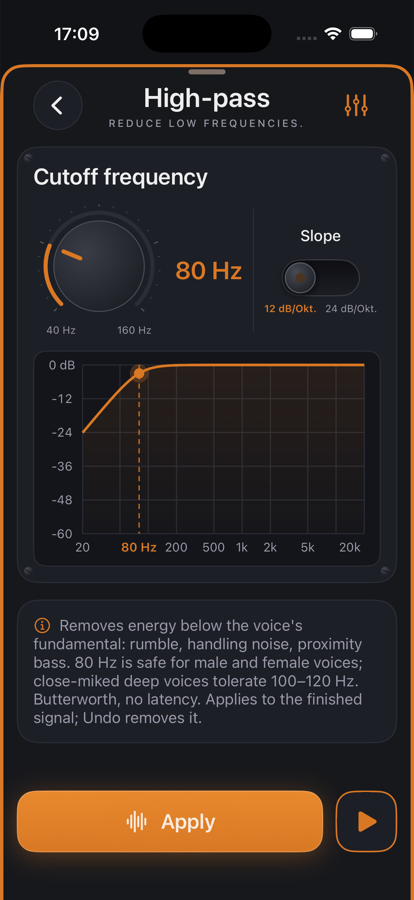
High-pass in jd.Edit

What the effect is for

Below about 80 Hz a voice carries no information — that is where rumble, a table thump and the proximity effect of a closely spoken microphone live. This energy eats headroom and makes compressor and limiter work for nothing.

The high-pass is a second- or fourth-order Butterworth filter: maximally flat in the passband, no ripple, no latency. The curve on the page is the filter's real response, not a drawing.

Benefits

  • ✓A clean low end without a thin voice — the fundamental stays untouched.
  • ✓More headroom for the dynamics that follow: leveler and compressor no longer react to rumble.
  • ✓Two slopes: 12 dB/oct gentle, 24 dB/oct for stubborn rumble.
  • ✓No latency — the editor position stays sample-accurate.

Included for free

When it makes sense

Desk recording

80 Hz, 12 dB/oct: rumble gone, voice unchanged.

Closely spoken microphone

100–120 Hz for low voices that boom close to the mic.

Outdoor recording with wind

24 dB/oct at 120 Hz takes the thumping without losing the speech.

Controls

Cutoff40–200 Hz, knob; −3 dB at that point.
Slope12 or 24 dB/octave — toggle.

Tips

💡High-pass first, then leveler and compressor — dynamics work cleanest in that order.

💡Male voices sit at 85–180 Hz, female voices at 165–255 Hz: 80 Hz is safe for both.

Chain order: High-pass → Leveler → Compressor → De-Esser → SoundsBetter → Limiter. The effects list can be reordered with “Reorder”.

Want to try it?

jd.Edit is free; every Pro feature can be used twenty times at no cost.

On the App Store