Creative Pitch From version 1.7

Pitch

New pitch, same timbre.

Pitch in jd.Edit

What the effect is for

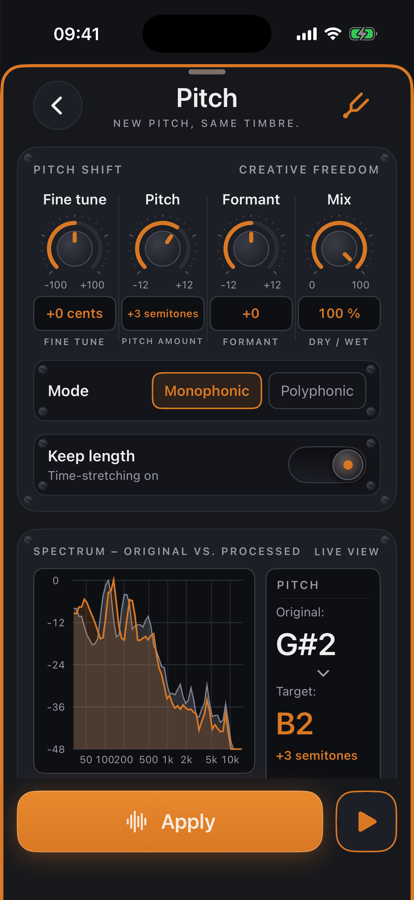
Pitch shifts the pitch without changing the duration: a phase vocoder with peak locking keeps the partials together, and the timbre — the formants — is separated via cepstrum and set independently. At “Formant 0” a voice stays the same person, only higher or lower; the formant knob can make it deliberately brighter or darker.

With “Keep length” switched off you get the tape effect: the recording runs faster or slower, pitch, duration and timbre change together. The analysis detects the fundamental (YIN) and shows original and target as notes, plus the spectra before and after processing.

Benefits

  • ✓Formant preservation: transposed speech sounds natural, not like a cartoon.
  • ✓Monophonic for speech and single instruments, polyphonic for chords and mixes.
  • ✓Fine tuning in cents — a slightly detuned recording is moved exactly.
  • ✓Preview with all knobs live; analysis with fundamental, pitch range and spectrum.

Included for free

When it makes sense

Adjust a voice

Lower a speaker's voice by 2–3 semitones without it sounding foreign.

Transpose music

Move a demo to another key to sing along — polyphonic, keep length.

Tape effect

Keep length off: half speed with a deep voice, or double speed as a stylistic device.

Detuned recording

The detected fundamental is 30 cents off — fine tune −30 cents puts it straight.

Controls

Pitch−12 … +12 semitones.
Fine tune−100 … +100 cents.
Formant−12 … +12 semitones; 0 = timbre stays.
Mix0–100 % share of the processed signal.
ModeMonophonic (short window) or polyphonic (long window).
Keep lengthOn: time-stretching. Off: tape — duration changes too.

Tips

💡For speech ±3 semitones with formant 0 — more quickly sounds artificial; beyond that, move the formant the other way.

💡Switch to polyphonic for chords and mixes, otherwise partials smear.

Chain order: High-pass → Leveler → Compressor → De-Esser → SoundsBetter → Limiter. The effects list can be reordered with “Reorder”.

Want to try it?

jd.Edit is free; every Pro feature can be used twenty times at no cost.

On the App Store